By Theo Brandt · Updated
Customer.io vs Loops: Pricing and Fit for SaaS (2026)
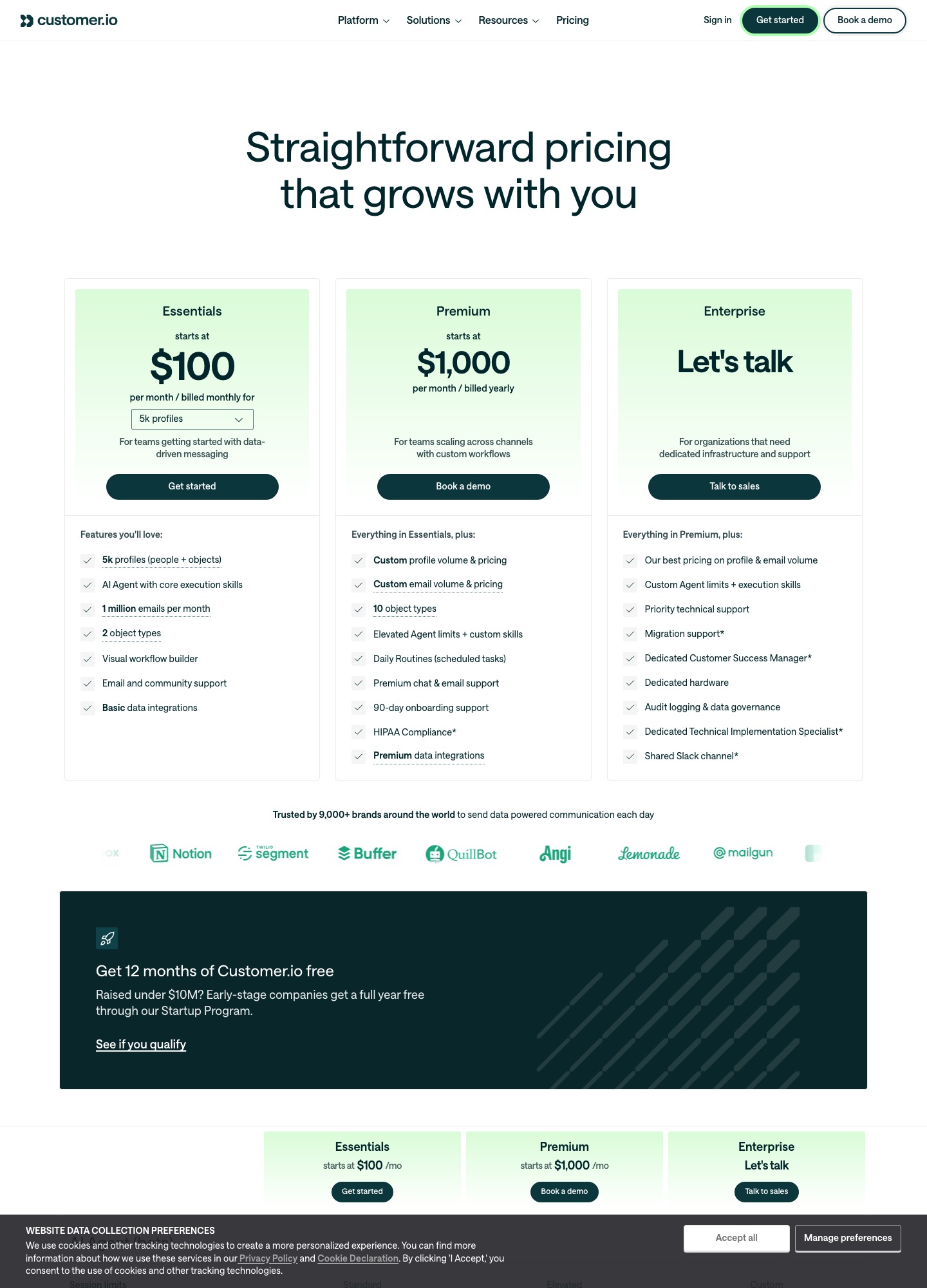
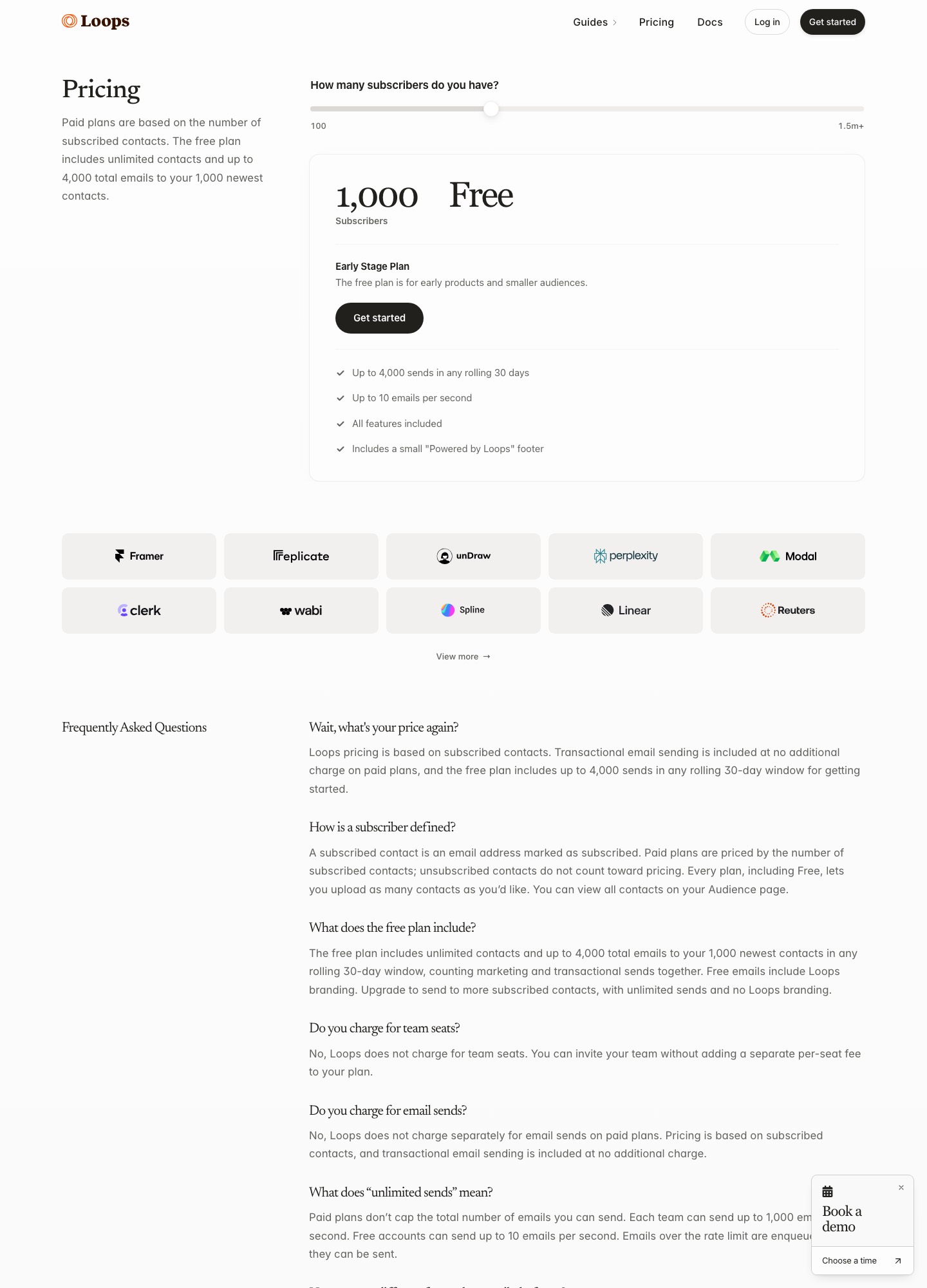
Pick Loops when one person writes the lifecycle emails and you want the bill to follow subscribed contacts: its pricing page reads $99 a month at 9,998 subscribers and $249 at 49,989. Pick Customer.io when product events, companies and several channels should decide what gets sent: its pricing page starts Essentials at $100 for 5,000 profiles and reads $145 at 10,000.
Which one, in short
Loops is the cheaper and quicker choice for a SaaS product whose journeys are a welcome series, a trial sequence and the occasional announcement. At 10,000 subscribers it costs $46 a month less than Customer.io Essentials, and at 50,000 the gap is $256.
Customer.io is the right choice once the messages depend on company-level data, on push or in-app channels, or on a workspace-and-permissions setup that a flat contact-based tool does not model. You pay for that reach in both money and setup hours.
Do not buy both to cover the same sequences. Each one needs its own copy of your contacts and its own unsubscribe handling, so a person can end up on two lists that disagree about whether they opted out.
Prices checked 7 October 2026; each price links to the vendor page it came from.
Both tools sell to the same buyer, a SaaS team that wants behaviour-triggered email without hiring an email specialist, and both include transactional sending in the plan. The difference is the unit you are charged on and how much of your product data the tool expects to hold. Loops bills by subscribed contacts and says on its pricing page that every plan includes all features. Customer.io bills by profiles, which cover both people and the objects (such as companies) you load next to them, and it layers channels, seats and support on top.
That unit matters more than any feature row. A 10,000-user product with 1,500 customer companies is a 10,000-subscriber account at Loops and, if the companies are loaded as objects, an 11,500-profile account at Customer.io.
| At a glance | Customer.io | Loops |
|---|---|---|
| Billing unit | Profiles, where people and objects both count; billed monthly on Essentials | Subscribed contacts only; unsubscribed contacts are not counted |
| Starting price | Essentials from $100 a month at 5k profiles; Premium from $1,000 a month billed yearly | Free plan, then paid plans that read $48 at 4,788 subscribers |
| Emails in the plan | 1 million a month on Essentials, then $0.12 per extra 1,000 | No separate send charge on paid plans; free plan stops at 4,000 sends in 30 days |
| Transactional email | Listed as included on every plan | Included on paid plans, including sends to people outside your audience |
| Channels | Email, push, in-app, SMS (custom volume), WhatsApp and webhooks | Email; the pricing page lists nothing beyond that |
| Company-level data | Objects: 2 types on Essentials, 10 on Premium | Not described on the pricing page |
| Seats | Unlimited user seats; 2 workspaces on Essentials | No charge for team seats |
What each one costs at 5,000, 10,000 and 50,000 people
The table uses the readouts each vendor's price selector displayed on 7 October. Customer.io's selector stops at 5k, 10k, 20k, 30k, 40k and 50k+ profiles; Loops' slider returns an exact subscriber count next to the price, so the figures below are the counts it showed rather than round numbers.
| Audience | Customer.io Essentials | Loops | Monthly gap |
|---|---|---|---|
| 1,000 contacts | $100 (the entry price is quoted for 5k profiles) | Free | $100 |
| About 5,000 | $100 at 5k profiles | $48 at 4,788 subscribers | $52 |
| About 10,000 | $145 at 10k profiles | $99 at 9,998 subscribers | $46 |
| About 25,000 | Between $235 (20k) and $325 (30k) | $198 at 24,339 subscribers | At least $37 |
| About 50,000 | $505 at 50k+ profiles | $249 at 49,989 subscribers | $256 |
Over a year the 10,000-contact gap is 12 x $46 = $552, and at 50,000 it is 12 x $256 = $3,072. Those are the sums that justify a decision. The 25,000 row shows a range because Customer.io's selector has no 25k stop; $235 at 20k and $325 at 30k bracket it, and $198 at Loops is below both.
Three details change the Customer.io side of the sum. First, objects count as profiles, so the 1,500 companies in the example above are billable. Second, Customer.io's billing documentation uses a high-watermark model: a profile that exists at any point in the billing period counts for that month, even if you delete it, and profiles in test or sandbox workspaces count too. Importing 2,000 trial sign-ups for a one-week experiment therefore costs a full month at the higher band. Third, going past a plan's allowance is charged at $0.009 per extra profile on Essentials, so 500 profiles over a band adds 500 x $0.009 = $4.50.
Emails are the other meter. Essentials includes 1 million a month, which is far more than most SaaS products send, but an email that bounces or is suppressed downstream still counts once it reaches the sending provider. A product that sends 1.5 million messages in a busy month would pay 500 x $0.12 = $60 on top of the plan. Loops charges nothing per send on paid plans, which makes its bill predictable; if you expect a very large transactional load, ask Loops in writing what that volume would cost before you rely on the included-sends wording.
What a SaaS team gets for the extra money
Customer.io's feature table is where the premium goes. On Essentials the page lists a visual workflow builder, a drag-and-drop editor next to a code editor, reusable components and saved templates, an AI-powered segment builder, send-time optimization, conversion tracking, reverse ETL, unlimited webhooks in both directions, an MCP server, and SSO with two-factor authentication. Push and in-app messages are listed as unlimited, WhatsApp is included, and SMS volume is custom. None of that is sold by Loops, whose pricing page is about email.
The objects row is the one to understand before you sign. Customer.io lets you load things other than people, such as companies, and lets those records start journeys and carry data. Essentials allows 2 object types and Premium allows 10. If your sales team wants a nudge when three people at one customer have stopped logging in, the object is where that logic lives. If your journeys only ever look at one user at a time, you are paying for a capability you will not use.
Essentials also has gaps worth reading on the comparison table: chat support, onboarding support, custom role-based permissions, managed deliverability and anonymous messages are all marked as not included, and the plan is limited to 2 workspaces. A team with a separate staging workspace for every environment can hit that limit quickly, and remember that those workspaces' profiles still feed the bill.
Loops offers the opposite trade. The free Early Stage plan allows unlimited contacts but only 4,000 sends in any rolling 30 days to your 1,000 newest contacts, with a small "Powered by Loops" footer and 10 emails per second; paid plans lift the send cap and the footer. Everything else is the same product on every tier, so there is no feature ladder to climb. If the sequences you need are welcome, activation and re-engagement flows, you will probably never miss what Customer.io sells.
| Your situation | Better default | Reason |
|---|---|---|
| Founder-led product, 3,000 contacts, welcome and trial emails | Loops | Free while under its 4,000-send cap, then $48 around 5,000 subscribers; nothing to configure beyond events and copy |
| B2B product where the account, not the user, triggers messages | Customer.io | Objects carry company data and start journeys; Essentials allows 2 object types |
| Mobile or desktop app that needs push and in-app next to email | Customer.io | Push and in-app are listed as unlimited; Loops lists email only |
| 50,000 subscribers and four or five straightforward sequences | Loops | $249 against $505+, a $3,072 yearly difference |
| Seed-stage company under $10M raised | Customer.io for the year, Loops after | Customer.io offers 12 months free through its Startup Program; Loops has a permanent free tier with caps |
| Healthcare data in messages | Customer.io Premium | HIPAA compliance is listed as custom on Premium and not included on Essentials |
Moving between them without double-sending
From Customer.io to Loops, start by deciding what happens to the objects. Export your people with their attributes and import them as Loops contacts, and flatten the company fields you still need (plan, seat count, owner) into contact properties, because the Loops pricing page describes no object model. Then list every campaign and segment-triggered journey that depends on object data; those are the flows that will not move one-to-one. Rebuild the rest as Loops workflows, send the same product events to Loops that you sent before, and keep Customer.io running for a full billing cycle with its audience frozen so the two never email the same person about the same milestone.
From Loops to Customer.io, the risk is on the bill, not the flow. Import only subscribed contacts, skip anyone who unsubscribed, and use a single workspace for the cutover test, since a duplicate profile in two workspaces is billed twice. Decide in advance which attributes become person data and which become object data, because changing that after launch means rewriting segments. Because Customer.io counts a profile for the whole month once it exists, do the bulk import right after a billing date rather than the day before one.
In both directions the unsubscribe list moves first, and the old sender's domain authentication stays in place until the new tool has sent a complete cycle of mail without complaints. If you are also considering a third option, the Loops alternatives guide and the Userlist vs Customer.io comparison cover the cases where neither of these two fits.
The call
For most SaaS teams under about 50,000 contacts with simple lifecycle needs, Loops is the better buy: lower price at every readout above, transactional email included, no seat fees, and no feature tiers to decide between. Choose Customer.io when your product data is shaped like companies and workspaces, when push or in-app messaging is part of the plan, or when you want the startup year free and have an engineer who will define the events properly. Read Loops against its sending-API rival in Loops vs Resend, see how Customer.io fares against a bigger enterprise suite in Customer.io vs Braze, or browse the full comparison list.
Questions about Customer.io and Loops
Is Loops cheaper than Customer.io?
At every volume both vendors publish, yes. Loops reads $48 at 4,788 subscribers and $99 at 9,998, against Customer.io Essentials at $100 for 5,000 profiles and $145 for 10,000. At 50,000 the readouts are $249 and $505+. Customer.io only closes the gap if you would otherwise need a second tool for push or company-level data.
Does Customer.io charge for transactional email?
Its comparison table lists transactional emails as included on Essentials, Premium and Enterprise. They still count toward the 1 million monthly emails on Essentials, and extra emails are $0.12 per 1,000, so a transactional-heavy product should total both streams before choosing.
What counts as a billable profile at Customer.io?
People and objects both count. A profile that existed at any time in the billing period is billed for that month even if you delete it, and the same profile in two workspaces is billed twice. Keep test data out of production workspaces, or accept that it counts.
Does Loops have a free plan?
Yes. It allows unlimited contacts, up to 4,000 total emails in any rolling 30 days to your 1,000 newest contacts, 10 emails per second, and a small Loops footer. Marketing and transactional sends count together toward the cap.
Which is better for a startup that has just launched?
If you have raised under $10 million, Customer.io's Startup Program gives 12 months free, which lets you try its full event model at no cost. If you have not, start on the Loops free plan and move to a paid tier when the 4,000-send cap starts to bite, which on the readouts above means roughly $48 a month.